MozLinker is an extension for Mozilla which imports a remote RDF file containing links into toolbar and menu.
The supported RDF file is more or less in RSS 1.0 format (http://purl.org/rss/1.0/) with RDF container enhancement to provide hierarchical structure support.
Here is the interface for the MozLinker.
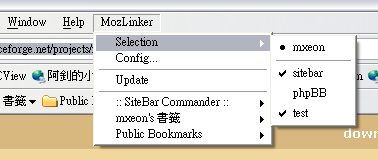

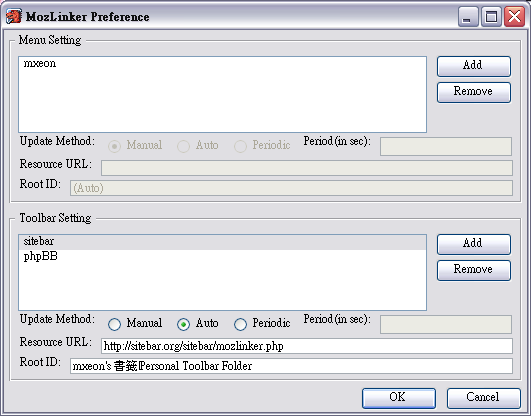
In the menu, you could add, remove and edit the datasources.
The dataresouce (displayed as resource URL) must be transfered by HTTP and in the support RDF format.
Display menu/toolbar could be selected by setting Root ID. Only the subtree rooted by Root ID will be shown.
The Root ID could be an absolute resource in the RDF, a relative resource in the RDF or "(Auto)".
(Set to "(Auto") will use the top level RDF container as Root ID.)
You could specify a container (Seq, Bag or Alt) to be the menu root by its resource uri.
Example:
Assume the following file located in http://hostname/folder/sample1.rdf. The 'Seq' resource will be http://hostname/folder/sample1.rdf#urn:root
| <RDF:RDF xmlns:RDF="http://www.w3.org/1999/02/22-rdf-syntax-ns#" xmlns:RSS="http://purl.org/rss/1.0/"> <RDF:Seq ID="urn:root" RSS:title="testrss"> <RDF:li> <RDF:Seq RSS:title="melink forum"> <RDF:li> |
There are 3 update methods which arranges from least use of bandwidth to most use of bandwidth.
Here are two example of supported RDF files.
Of course it also support the RSS 1.0 format.
e.g. http://www.cultivate-int.org/cultivateinteractive.xml
If the RDF file is generated by script rather than standalone file, it need to specify the 'Content Type' to 'text/rdf'.
In additition, to avoid the caching problem that prevent updating GUI, add the appropiate HTTP header.
e.g.
| Cache-Control: no-cache, pre-check=0, post-check=0, max-age=0 Cache-Control: private, pre-check=0, post-check=0, max-age=0 Expires: current time GMT Last-Modified: current time GMT |
With the current time replaced by the RDF generation time.
To support sitebar, you need a mozlinker.php located at Sitebar server.
Then add the following link into MozLinker -> Config... -> Menu setting->Resource URL.
(Assume the Sitebar hosted on http://www.sitebar.org/sitebar/ )
http://www.sitebar.org/sitebar/mozlinker.php
and keep the Root ID as '(Auto)'. (or manually set it as 'urn:root' to have a better performance)
If you want to have a toolbar similar to the bookmarks system of mozilla, add the following link into MozLinker -> Config... -> Toolbar setting->Resource URL.
http://www.sitebar.org/sitebar/mozlinker.php
Then change the Root ID to
(Assume the bookmark appeared in toolbar is in folder "mxeon's bookmark -> Personal Toolbar Folder ")
mxeon's bookmark|Personal Toolbar Folder
Note: Although the ID appears as mxeon's bookmark|Personal Toolbar Folder in the RDF generated by mozlinker.php, you should input the ' as '. That is what you see in the Sitebar.
Note: There is a | seperating different layer of folders and there is no space before or after |